I got asked recently to explain what all those network terms mean. You know the ones. IP address, MAC address, DNS. They show up in error messages and router settings and most people just ignore them until something stops working.
So here’s my attempt at a no-nonsense explanation.
IP Addresses
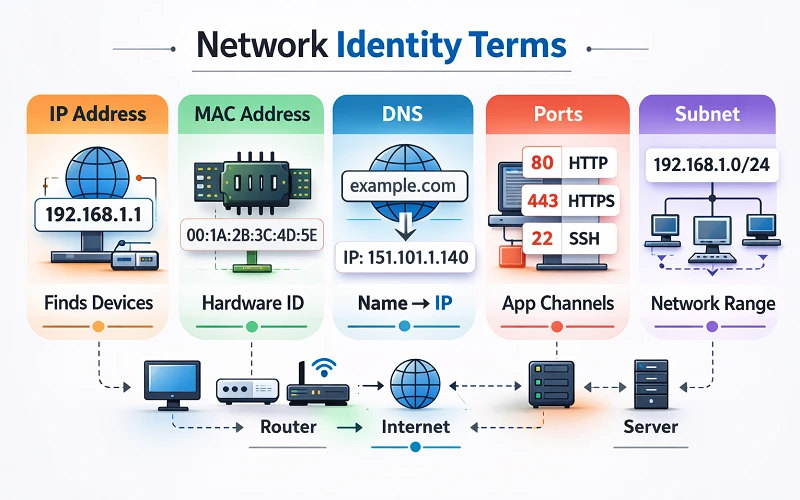
An IP address is how devices find each other on networks. When you load a website, your computer needs to know where to send the request. The IP address is that destination.
Most IPs you’ll see look like 192.168.1.1 or 73.42.189.12. Four numbers with dots. That’s IPv4, which has been the standard forever. Your router assigns local IPs to everything in your house (these start with 192.168 or 10.0 usually). Meanwhile your ISP assigns a public IP to your router, and that’s what websites actually see.
NAT handles the translation between internal and external addresses. I won’t get into how NAT works because honestly it’s boring, but that’s why your phone can have an address 192.168.1.23 and still browse the web even though no website has ever heard of that address. It just works and you don’t have to think about it.
One thing that trips people up: finding your proxy server address uses this same format. Proxies aren’t magic. They’re just servers with IP addresses like anything else.
We’re running out of IPv4 addresses by the way. Only 4.3 billion exist and there are way more devices than that now. IPv6 is the replacement with basically unlimited addresses, but adoption took forever. Google tracks this and we’re finally at around 45%.
MAC Addresses
A totally different thing. A MAC address is burned into hardware when it’s manufactured. Every network chip has one. Your WiFi card, your Ethernet port, your phone’s wireless radio.
The format looks like 00:1A:2B:3C:4D:5E. The first three pairs indicate the manufacturer and you can actually look this up online. Handy for figuring out what mystery devices are on your network.
The main thing MAC addresses do is identify devices at the hardware level. Your router tracks them. Some networks use MAC filtering to only allow known devices to connect, though anyone technical can spoof a MAC in about thirty seconds so it’s not real security. More of a “keep honest people honest” situation.
DNS
This one’s easy to explain. DNS translates domain names to IP addresses.
You type reddit.com, your computer asks a DNS server what IP that is, and gets back a number like 151.101.1.140. Then your browser connects to that IP. This happens before any page loads and usually takes maybe 30 milliseconds.
Your ISP provides DNS servers automatically but a lot of people use alternatives. Google’s is 8.8.8.8. Cloudflare runs 1.1.1.1 which is supposedly faster. ICANN coordinates the whole global system with root servers and all that.
When DNS has problems the internet feels completely broken even though technically it’s fine. You just can’t get anywhere because nothing translates.
Ports
Okay so the IP address gets data to your computer. But your computer runs tons of programs. How does it know which program should receive which data?
Ports. They’re just numbers from 0 to 65535. Each program listens on specific ports. Your browser expects web traffic on port 443. Your email app listens on port 993. When data arrives, the port number tells the system where to route it.
Common ones to know: 80 is HTTP, 443 is HTTPS, 22 is SSH, 21 is FTP. Stanford keeps a list if you ever need to look one up.
Firewalls are basically port bouncers. They decide what gets through based on port numbers. Block port 22 and nobody’s SSHing into your machine.
Subnet Masks
I’ll keep this brief because it rarely matters unless you’re doing manual network config.
A subnet mask defines which part of an IP address is the network and which part is the device. Home networks use 255.255.255.0 which means in an address like 192.168.1.47, the first three numbers are the network (192.168.1) and the last number is your specific device (47).
Get this wrong when setting a static IP and nothing works right. Traffic gets sent to the wrong places. Annoying to debug.
Wrapping Up
That covers the main terms. MAC addresses identify hardware. IPs identify devices on networks. DNS matches names to numbers. Ports direct traffic to programs. Subnets define boundaries.
None of this matters day to day until you hit a weird network issue. Then it helps to know what the error messages are actually talking about.